

%20(2).svg)

Prepare Your NXP i.MX 93 EVK for Wi-Fi 6E and Bluetooth Evaluation with the SX-SDMAX6E
Successful wireless evaluation begins with a correctly configured hardware platform. Hardware configuration, boot mode, and debug visibility all play an important role in establishing a reliable development environment.
For engineers evaluating NXP i.MX 93 EVK with the Silex SX-SDMAX6E, establishing a correct hardware baseline is the fastest way to reach a working wireless system.
This guide outlines the minimum required hardware configuration to move from board power-up to a validated wireless evaluation environment.
Hardware Preparation for IW623 Evaluation
Before beginning the Linux BSP and wireless software installation procedures described in the NXP Getting Started Guide, the hardware platform should be properly configured. Key preparation steps include:
- Appropriate USB-C Power Delivery supply
- Correct M.2 Key E module installation
- Proper boot mode and debug configuration
Completing these hardware preparation steps helps ensure the platform is ready for the Linux BSP flashing, driver installation, and wireless validation procedures described later in the guide.
i.MX 93 EVK Evaluation Platform Overview
The i.MX 93 EVK is a modular evaluation system composed of:
- System-on-Module (SOM)
- Baseboard
The evaluation platform includes:
- USB Type-C interfaces for power and host connection
- Ethernet interface
- eMMC and microSD support
- M.2 Key E slot for the IW623 wireless module
The NXP Getting Started Guide uses the i.MX 93 EVK as the reference hardware platform throughout the IW623 evaluation process.
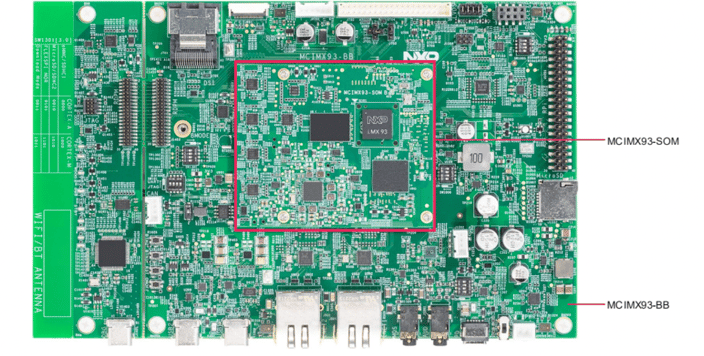
i.MX 93 Development Board
SX-SDMAX6E Module Integration (IW623-Based Design)
The SX-SDMAX6E module is based on the NXP IW623 wireless chipset and is designed for embedded wireless connectivity.
Key characteristics include:
- Tri-band Wi-Fi 6E (2.4 GHz / 5 GHz / 6 GHz)
- Bluetooth 6.1 over UART interface
- SDIO 3.0 host interface for Wi-Fi data transfer
- Standard M.2 Key E form factor
The NXP Getting Started Guide uses the SDIO interface for Wi-Fi communication and the UART interface for Bluetooth communication.
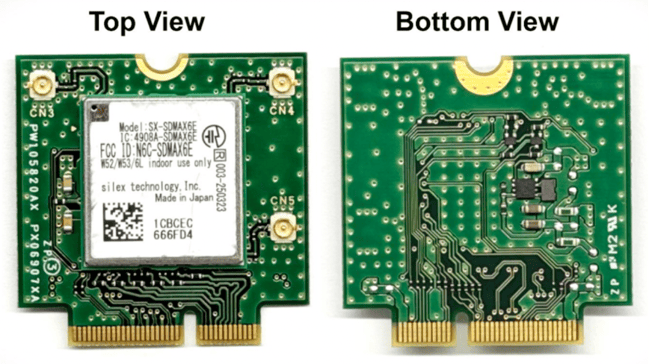
SX-SDMAX6E IW623 Module
Required Hardware for IW623 Evaluation
Before beginning the Linux BSP flashing and software installation procedures described in the guide, ensure the following hardware is available:
- i.MX 93 EVK (SOM + baseboard assembly)
- 45 W USB-C Power Delivery supply (5–20 V profiles)
- USB Type-C host connection cable
- SX-SDMAX6E module properly installed in M.2 Key E slot
- Host PC for Linux BSP flashing and software installation
The Getting Started Guide specifies using a USB-C Power Delivery power supply to ensure the EVK is properly powered during evaluation.
Critical Boot Mode Configuration
Before flashing the Linux BSP, configure the board for Serial Downloader Mode (BOOT_MODE = 0011) as described in the guide. This enables USB-based flashing using NXP's manufacturing tools.
After flashing:
- Switch the boot configuration back to eMMC boot mode (0000) for normal operation.
- EVK powered using a USB-C Power Delivery supply
- SX-SDMAX6E module properly installed in the M.2 Key E slot
- Boot mode configured for Serial Downloader before BSP flashing
- USB connection established to the host PC
- UART console available during system setup
Debug Access During System Setup
The NXP Getting Started Guide uses the onboard FT4232H USB-to-UART bridge to provide console access during system setup. Available interfaces include:
- Cortex-A55 Linux console
- Cortex-M33 console
The UART console is used throughout the procedures described in the guide.
Hardware Setup Summary
The hardware preparation steps described in the NXP Getting Started Guide include:
- EVK powered using a USB-C Power Delivery supply
- SX-SDMAX6E module properly installed in the M.2 Key E slot
- Boot mode configured for Serial Downloader before BSP flashing
- USB connection established to the host PC
- UART console available during system setup
After completing the hardware setup, the guide continues with the following software procedures:
- Linux BSP flashing
- IW623 driver and firmware installation
- Wi-Fi validation
- Bluetooth validation
Software Setup and Wireless Validation
Following hardware setup, the guide continues with:
- Linux BSP flashing
- Driver and firmware deployment
- Wi-Fi STA and AP mode validation
- Bluetooth initialization and testing
These steps are covered in the companion IW623 Linux Setup & Driver Loading Guide blog, coming soon.
Accelerate IW623 Evaluation
For engineering teams evaluating Wi-Fi 6E and Bluetooth connectivity on the NXP i.MX 93 platform, the NXP Getting Started Guide provides step-by-step guidance for hardware setup, Linux software installation, and wireless validation using the IW623 wireless chipset on the i.MX 93 EVK.
Continue your evaluation with access to technical resources and hardware support through the SX-SDMAX6E Early Access Program.