

%20(2).svg)

As enterprise Wi-Fi networks continue to scale in high-density, mission-critical environments such as healthcare, industrial IoT, and medical device connectivity, engineers are increasingly focused on optimizing Wi-Fi 6E tri-band architectures (2.4 GHz, 5 GHz, and 6 GHz) to improve performance, reliability, and spectrum efficiency.
Following our recent webinar with NXP Semiconductors, attendees raised a wide range of practical engineering questions around 6 GHz Wi-Fi adoption, tri-band band steering, channel congestion in 5 GHz networks, and enterprise deployment strategies for Wi-Fi 6E and Wi-Fi 7 readiness.
In this blog, we explore the key technical themes from that discussion, including how devices select between Wi-Fi frequency bands, what problems the 6 GHz spectrum solves compared to 5 GHz Wi-Fi, and how tri-band Wi-Fi impacts real-world enterprise network design. These insights help clarify how Wi-Fi 6E and 6 GHz deployment strategies are reshaping high-performance wireless infrastructure.
The shift toward Wi-Fi 6E and tri-band Wi-Fi design is not just an incremental upgrade, it represents a fundamental change in how enterprise wireless networks are engineered for scalability, reduced latency, and improved capacity. As device density continues to increase, particularly in regulated and mission-critical environments, leveraging additional 6 GHz spectrum and intelligent band steering becomes essential for maintaining consistent wireless performance.

Question 1: How does a device decide between 2.4, 5, and 6 GHz, and does it require manual setup?
When the radio module is configured to operate as a client device, it scans for available access points in the vicinity and evaluates the available channels being used across the 2.4, 5, and 6 GHz bands. Based on the scan results and connection conditions, the device selects the appropriate network and frequency band automatically. If needed, specific frequency bands can also be disabled from the scan manually.
Question 2. What specific problems does the 6 GHz band solve that Wi-Fi 6 (5 GHz) cannot?
The 6 GHz band helps address channel congestion in the 5 GHz frequency band by providing significantly more available spectrum and additional channels. It is similar to opening new lanes on a freeway, with many devices already operating on 5 GHz, networks can become crowded and experience interference. The 6 GHz band reduces congestion and enables higher performance, lower latency, and more reliable connections for supported devices. Since only devices that support Wi-Fi 6E or Wi-Fi 7 can operate on 6 GHz, the band is less crowded and more efficient than existing Wi-Fi bands.
Question 3. Is Tri-Band better for raw performance, or is it primarily about increasing network capacity?
Tri-Band primarily helps increase network capacity by distributing devices and traffic across multiple frequency bands, which helps reduce congestion and improve overall network efficiency. Depending on the environment and supported devices, it can also improve performance by enabling faster and more reliable connections.
Question 4. When and where is 6 GHz actually worth deploying, and does it require a total infrastructure overhaul?
6 GHz is typically worth deploying in environments where 2.4 GHz and 5 GHz channels are already heavily occupied and experiencing congestion. To enable 6 GHz, access points must support the 6 GHz band. In enterprise networks, the WLAN controller may also need to be updated or upgraded to support these capabilities, depending on the existing infrastructure.
Additionally, WPA3 security is mandatory for operation in the 6 GHz band. This requires compatible hardware and updated security configuration, and in some cases controller-level upgrades to ensure proper support.
Question 5. Do you recommend a dedicated 6 GHz SSID, and should 2.4 GHz be disabled for medical devices?
It is not generally recommended to disable the 2.4 GHz band on access points, as many legacy medical devices still rely on it for connectivity. For 6 GHz, a dedicated SSID can be used if you want client devices to specifically scan and connect only within the 6 GHz band, provided you have confirmed full 6 GHz coverage across the entire area.
Question 6. What is the ideal channel width for maximum reliability in a tri-band environment?
For maximum reliability, 20 MHz is generally recommended for the 2.4 GHz band. In 5 GHz and 6 GHz, channel bandwidth selection depends on the types of client devices, deployment density, and overall channel planning strategy, so there is no single fixed answer.
Following best practices, 2.4 GHz is typically kept at 20 MHz. In 5 GHz, 20 MHz, 40 MHz, or 80 MHz can be used, but wider channel widths increase the likelihood of interference in congested environments. The same principle applies to 6 GHz, where 80 MHz and even 160 MHz channels are available. However, because 6 GHz is less congested and supports newer client devices, wider channels can often be used with a lower risk of interference compared to 5 GHz.
As enterprise Wi-Fi networks evolve to support higher device density, Wi-Fi 6E and 6 GHz spectrum adoption are becoming critical design considerations for achieving scalable, high-performance wireless connectivity.
From 5 GHz channel congestion mitigation to 6 GHz Wi-Fi deployment planning, WPA3 security requirements, and enterprise WLAN controller integration, designing a robust tri-band Wi-Fi architecture is essential for next-generation wireless systems in healthcare, industrial IoT, and enterprise environments.
Ready to Optimize Your Tri-Band Wi-Fi Strategy?
Move from design uncertainty to deployment confidence with expert support for your Wi-Fi 6E and tri-band network strategy, including guidance on 6 GHz access point deployment, enterprise Wi-Fi design best practices, and NXP-based wireless platform integration.
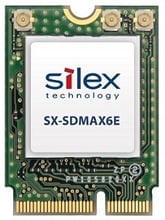
Download the SX-SDMAX6E product brief